Notice: Any messages purporting to come from this site telling you that your password has expired, or that you need to verify your details, confirm your email, resolve issues, making threats, or asking for money, are
spam. We do not email users with any such messages. If you have lost your password you can obtain a new one by using the
password reset link.
Due to spam on this forum, all posts now need moderator approval.
Entire forum
➜ MUSHclient
➜ Bug reports
➜ Display gone goofy
It is now over 60 days since the last post. This thread is closed.
Refresh page
| Posted by
| FrozenFlames
(1 post) Bio
|
| Date
| Sun 21 Mar 2010 03:20 AM (UTC) |
| Message
| Somehow, the side thingy on my MUSHclient stretched out across the screen, leaving about a half inch strip for windows. I cannot find anyway to move it. Hard to describe so here's a link to a (kinda small) picture.
http://i208.photobucket.com/albums/bb38/FrozenFlames9/mushissues-2.jpg | | Top |
|
| Posted by
| Twisol
USA (2,257 posts) Bio
|
| Date
| Reply #1 on Sun 21 Mar 2010 03:28 AM (UTC) Amended on Sun 21 Mar 2010 03:31 AM (UTC) by Twisol
|
| Message
| That happens on accident every so often. It's almost funny sometimes; other times it makes you want to rip your hair out.
Do you see the horizontal strip of darker grey in that big area to the left? Click and drag the leftmost border of it, you should get a sort of fuzzy outline following your mouse. Drag it out of MUSHclient; drop it on your Windows taskbar. It should pop out into its own miniature window, and cause the output window in MUSHclient to become normal again. Then just drag that little grey window below the input bar, and it should fall back into place. The grey bar normally rests against the left side of MUSHclient, so if it's a bit to the right (but still below the output window) when you drop it, you can drag the left side again and move it to the edge.
If that doesn't make sense, let me know and I'll make a picture tutorial. |
'Soludra' on Achaea
Blog: http://jonathan.com/
GitHub: http://github.com/Twisol | | Top |
|
| Posted by
| Nick Gammon
Australia (23,173 posts) Bio
Forum Administrator |
| Date
| Reply #2 on Sun 21 Mar 2010 03:33 AM (UTC) |
| Message
| |
- Nick Gammon
www.gammon.com.au, www.mushclient.com | | Top |
|
| Posted by
| Twisol
USA (2,257 posts) Bio
|
| Date
| Reply #3 on Sun 21 Mar 2010 03:35 AM (UTC) |
| Message
| Or that.
Nick, does MFC really not let you "lock" that particular control? :| |
'Soludra' on Achaea
Blog: http://jonathan.com/
GitHub: http://github.com/Twisol | | Top |
|
| Posted by
| Nick Gammon
Australia (23,173 posts) Bio
Forum Administrator |
| Date
| Reply #4 on Sun 21 Mar 2010 03:36 AM (UTC) |
| Message
| | You try it. Besides you don't want it locked, you are supposed to be able to move it around. |
- Nick Gammon
www.gammon.com.au, www.mushclient.com | | Top |
|
| Posted by
| Twisol
USA (2,257 posts) Bio
|
| Date
| Reply #5 on Sun 21 Mar 2010 03:38 AM (UTC) |
| Message
|
Nick Gammon said:
You try it. Besides you don't want it locked, you are supposed to be able to move it around.
Huh. I never knew that was intentional. |
'Soludra' on Achaea
Blog: http://jonathan.com/
GitHub: http://github.com/Twisol | | Top |
|
| Posted by
| Nick Gammon
Australia (23,173 posts) Bio
Forum Administrator |
| Date
| Reply #6 on Sun 21 Mar 2010 06:08 AM (UTC) |
| Message
| Sure, like this:
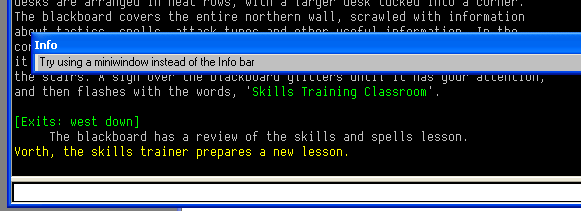
|
- Nick Gammon
www.gammon.com.au, www.mushclient.com | | Top |
|
| Posted by
| Twisol
USA (2,257 posts) Bio
|
| Date
| Reply #7 on Sun 21 Mar 2010 06:25 AM (UTC) Amended on Sun 21 Mar 2010 06:26 AM (UTC) by Twisol
|
| Message
| | Right, yeah. I just never thought moving it could actually be considered useful. I'd bet that 95% of MUSHclient's users don't know you can do that, and 99% of those who do know about it prefer it at the bottom. And a good percentage of those who don't know about it probably fall face first into the issue FrozenFlames had. |
'Soludra' on Achaea
Blog: http://jonathan.com/
GitHub: http://github.com/Twisol | | Top |
|
The dates and times for posts above are shown in Universal Co-ordinated Time (UTC).
To show them in your local time you can join the forum, and then set the 'time correction' field in your profile to the number of hours difference between your location and UTC time.
24,077 views.
It is now over 60 days since the last post. This thread is closed.
Refresh page
![[Go to top]](/images/gototop.gif) top
top
