Notice: Any messages purporting to come from this site telling you that your password has expired, or that you need to verify your details, confirm your email, resolve issues, making threats, or asking for money, are
spam. We do not email users with any such messages. If you have lost your password you can obtain a new one by using the
password reset link.
Due to spam on this forum, all posts now need moderator approval.
Entire forum
➜ MUSHclient
➜ General
➜ New scripting function: utils.filterpicker
|
New scripting function: utils.filterpicker
|
It is now over 60 days since the last post. This thread is closed.
Refresh page
| Posted by
| Nick Gammon
Australia (23,173 posts) Bio
Forum Administrator |
| Date
| Thu 23 Sep 2010 05:07 AM (UTC) Amended on Thu 23 Sep 2010 06:22 AM (UTC) by Nick Gammon
|
| Message
| Version 4.62 of MUSHclient has a new Lua utility: utils.filterpicker.
This lets you supply a lengthy list of items you might want the player to pick from, and lets you filter the list down, in exactly the same way that the "function list" dialog works (it is the same dialog box).
You initially supply a table of items you want the player to see, with corresponding keys. For example, a room description could be what you see, and the internal room number could be the key.
Or it might be a list of spells, or quests, or something like that.
Then the player can filter down (eg. by typing in "fire" for fire spells, or "cave" for rooms with "cave" in the name). Then they choose which one, which is returned to the calling function. That could then be used to speedwalk to that room, or take other appropriate action.
The calling sequence is:
result = utils.filterpicker (t, title, initial_filter )
The only required argument is the table of choices (t).
- t - table of key/value pairs
- title = title of box - if nil, defaults to "Filter" (max 100 characters)
- initial_filter = initial filter value - defaults to no filter
For example, using one of my mapping databases to generate room names and room numbers:
db = assert (sqlite3.open ("/Program Files/mushclient/achaea.com_23.db" ))

t = {}

for row in db:nrows ("SELECT uid, name FROM rooms") do
  t [row.uid] = row.name
end

result = utils.filterpicker (t, "Choose room")

if result then
  print ("You chose key", result, "which is", t [result])
else
  print "Nothing chosen"
end -- if

db:close ()
With no filter selected I see something like this:
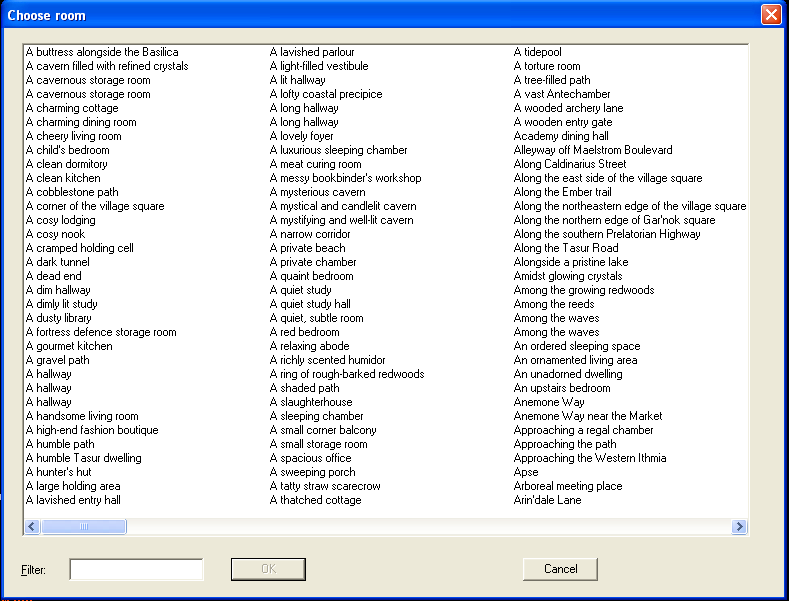
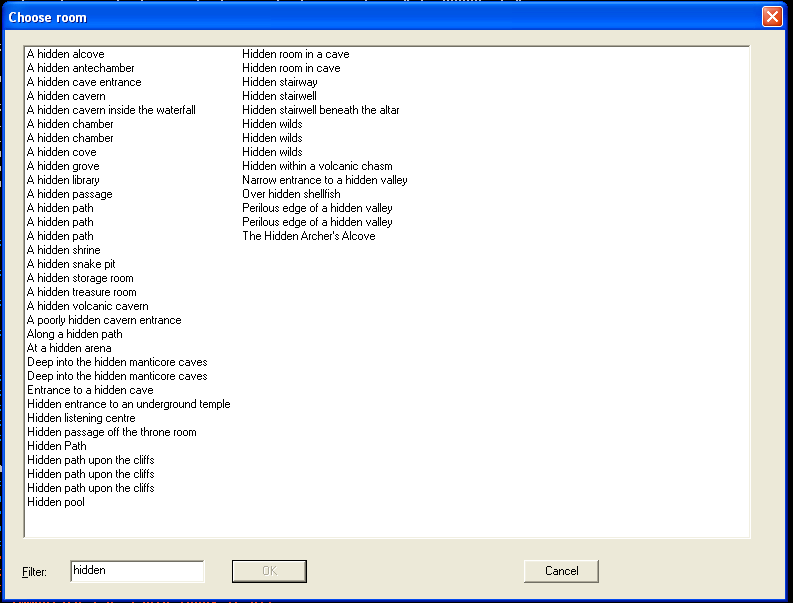
And if I type "hidden" into the filter field I see this:
If I choose a room I see this:
You chose key 24931 which is A bend in the shallow marsh
|
- Nick Gammon
www.gammon.com.au, www.mushclient.com | | Top |
|
| Posted by
| Nick Gammon
Australia (23,173 posts) Bio
Forum Administrator |
| Date
| Reply #1 on Fri 24 Sep 2010 12:11 AM (UTC) |
| Message
| The filter picker now has the additional functionality that you can choose whether or not to sort the displayed data (thus you might display players in level order, for example).
Also you can supply an optional filter function as the 5th argument. This lets you decide, in Lua, for each item whether to display it. You could write a sophisticated filter that filters, for example, players based on their class, or auction data based on the sale value, rather than just a simple string filter. |
- Nick Gammon
www.gammon.com.au, www.mushclient.com | | Top |
|
| Posted by
| Nick Gammon
Australia (23,173 posts) Bio
Forum Administrator |
| Date
| Reply #2 on Fri 24 Sep 2010 12:45 AM (UTC) Amended on Fri 24 Sep 2010 05:51 AM (UTC) by Nick Gammon
|
| Message
| An example of a filter function is below:
function filter (wanted, key, value)
  return  exits [key] and exits [key] [wanted]
end -- filter

db = assert (sqlite3.open ("/Program Files/mushclient/achaea.com_23.db" ))

rooms = {}
exits = {}

-- find rooms
for row in db:nrows ("SELECT uid, name FROM rooms limit 400") do
  rooms [row.uid] = row.name
end

-- find exits
for row in db:nrows ("SELECT fromuid, touid, dir FROM exits") do
  local room =  tostring (row.fromuid)

  exits [room] = exits [room] or {}
  exits [room] [row.dir] = true
end

result = utils.filterpicker (rooms, "Choose room", "", false, filter)

if result then
  print ("You chose key", result, "which is", rooms [result])
else
  print "Nothing chosen"
end -- if

db:close ()
In this example I am reading in the exits (from each room) from the database and storing them in a separate table.
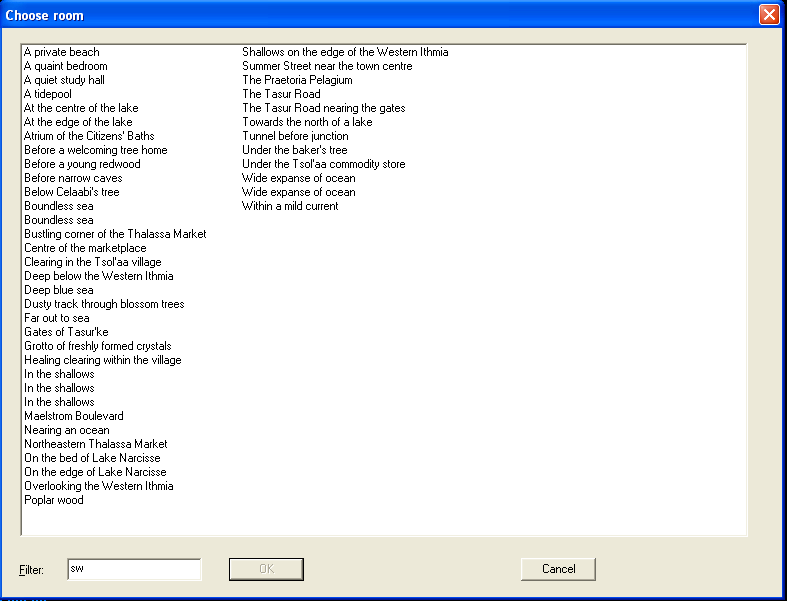
Then the filter function gets you to type an exit (eg. "sw") and applies that direction to see if the room being considered has an exit in that direction. Thus the list is filtered to be showing only those rooms that have an exit in the desired direction.
 |
- Nick Gammon
www.gammon.com.au, www.mushclient.com | | Top |
|
| Posted by
| Nick Gammon
Australia (23,173 posts) Bio
Forum Administrator |
| Date
| Reply #3 on Fri 24 Sep 2010 05:39 AM (UTC) |
| Message
| This filtering works surprisingly quickly. On my test database I had 11699 rooms. Loading the 11699 rooms and 29349 exits (from the code above, but without the "limit 400" part) took 1.25 seconds. In itself, that wasn't bad considering the amount of data being processed.
Then if you type "e" into the filter box it takes about 0.5 seconds to refresh the dialog (which means it had to apply the function 11699 times, and since there were 4169 rooms with an exit east, the resulting dialog box had 4169 entries).
This is probably a bit of an extreme example, a more realistic one would be to do a "who" and filter based on level or class, in which case you probably one have a hundred or so entries to filter. |
- Nick Gammon
www.gammon.com.au, www.mushclient.com | | Top |
|
| Posted by
| Nick Gammon
Australia (23,173 posts) Bio
Forum Administrator |
| Date
| Reply #4 on Tue 12 Jul 2011 04:19 AM (UTC) Amended on Tue 12 Jul 2011 04:53 AM (UTC) by Nick Gammon
|
| Message
| Version 4.76 adds a sixth argument: a "filter prepare" function.
This function is called once every time the filter box is typed into. This lets you "prepare" for filtering by, for example, doing a database lookup of all matching records using FTS3.
Then the filter function (which is called for each item) could cross-check if a particular item is wanted right now.
The filter prepare function could look like this:
function filter_prepare_function (wanted)
  wanted_rooms = {}
  for row in db:nrows ("SELECT uid FROM rooms WHERE name MATCH '" .. wanted .. "'") do
    wanted_rooms [row.uid] = true
  end
end -- filter_prepare_function
|
- Nick Gammon
www.gammon.com.au, www.mushclient.com | | Top |
|
The dates and times for posts above are shown in Universal Co-ordinated Time (UTC).
To show them in your local time you can join the forum, and then set the 'time correction' field in your profile to the number of hours difference between your location and UTC time.
13,459 views.
It is now over 60 days since the last post. This thread is closed.
Refresh page
![[Go to top]](/images/gototop.gif) top
top