I got this idea from World of Warcraft where, in the chat window, text which was older than a minute would fade to black. The idea was, if nothing much was happening, the only things you would see in the chat window would be "new" stuff and not things that happened 10 minutes ago.
If you want to try this out you need to get the latest pre-release build (see below for how to do this), open the Immediate scripting window (Ctrl+I) and copy/paste this line, then click Run:
What this does is, after the specified seconds, lines older than that will fade (over 8 seconds) to 20% opacity.
You can control both of those figures:
Here is an example:
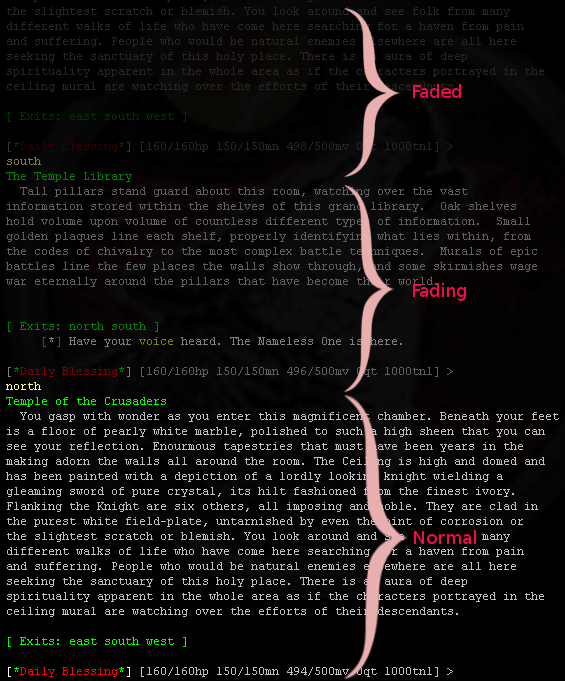
You can see the text at the bottom is not faded, in the middle it is fading out, and at the top (20% is quite dim) the completely faded text.
I think the effect is quite good. On a busy MUD, you won't notice it, because messages are scrolling past quickly. On a slow MUD (or slow time of day) you can glance at the screen and see in full opacity recent messages, and in dimmed opacity older messages.
The Config_Option_Changer plugin has been amended to support these three new options. You can RH-click the link above, download the new plugin, and replace the one in your MUSHclient installation folder -> worlds -> plugins folder with it.
See the post here: http://www.gammon.com.au/forum/?id=13903
If you have version 5.06 or above of MUSHclient then you already have this feature installed.
If you want to try this out you need to get the latest pre-release build (see below for how to do this), open the Immediate scripting window (Ctrl+I) and copy/paste this line, then click Run:
SetOption ("fade_output_buffer_after_seconds", 30) -- some figure in the range 0 to 3600
What this does is, after the specified seconds, lines older than that will fade (over 8 seconds) to 20% opacity.
You can control both of those figures:
  SetOption ("fade_output_opacity_percent", 20)  -- fade to 20% (range 0 to 100)
  SetOption ("fade_output_seconds", 8)           -- fade over 8 seconds (range 1 to 60)
Here is an example:
You can see the text at the bottom is not faded, in the middle it is fading out, and at the top (20% is quite dim) the completely faded text.
Notes
- The fading is non-destructive - the output buffer doesn't change, so all functions that query it will get the same results.
- If you scroll (eg. page-up, scroll-wheel) the text instantly becomes 100% opacity, so you can read old messages if you want.
- After scrolling, the text fades out again after the specified interval, one you have returned the buffer to the end (eg. hitting PgDn).
- The default is unchanged behaviour from before (if "fade_output_buffer_after_seconds" is zero, then no fading occurs).
- A long range for "fade_output_seconds" (eg. 60 seconds) would give a subtle effect of grading messages so that recent ones are full intensity, and older ones would gradually become dimmer.
- To make this work a timer kicks in and does a Redraw() every second.
I think the effect is quite good. On a busy MUD, you won't notice it, because messages are scrolling past quickly. On a slow MUD (or slow time of day) you can glance at the screen and see in full opacity recent messages, and in dimmed opacity older messages.
Easy way of changing the options
The Config_Option_Changer plugin has been amended to support these three new options. You can RH-click the link above, download the new plugin, and replace the one in your MUSHclient installation folder -> worlds -> plugins folder with it.
How to get the pre-release build
See the post here: http://www.gammon.com.au/forum/?id=13903
If you have version 5.06 or above of MUSHclient then you already have this feature installed.